 xLiveWallpaper
Dragon Ball Goku Super Saiyan 4 Live Wallpaper
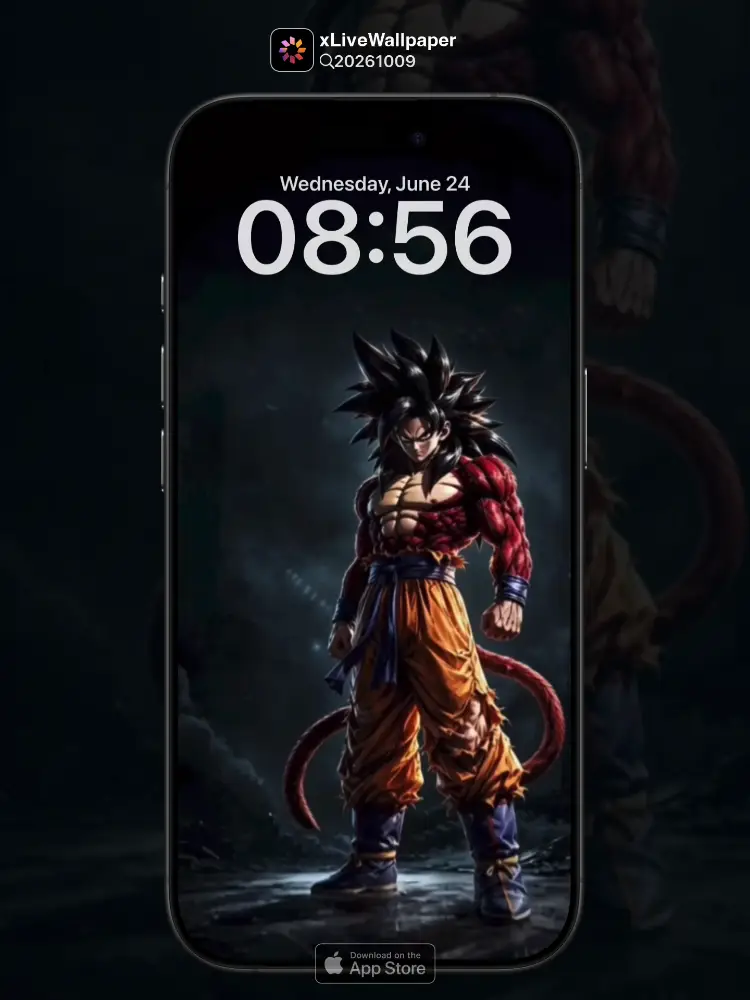
No.20261009 Dragon Ball Goku Super Saiyan 4 Live Wallpaper
Crimson fur ignites across his body, golden eyes burning with primal fury! 🔥🐉 Witness Goku as he transforms into Super Saiyan 4 — the ultimate fusion of Saiyan and Great Ape power, radiating an aura of unstoppable might.
You can now join our live wallpaper club at early-bird price, supporting both Android video and iOS Live Photo formats.
https://locklive.gumroad.com/l/vip
iPhone users search ‘20261009’ in xLiveWallpaper App
Download:https://apps.apple.com/app/apple-store/id6747997192?pt=611621&ct=xlivewallpaper&mt=8
#DragonBall #Goku #SuperSaiyan4 #LiveWallpaper #xLiveWallpaper #LockLive
No.20261009 七龍珠 悟空超級賽亞人第四階 動態壁紙
深紅色毛髮覆蓋全身,金色的眼眸燃燒著原始的憤怒!🔥🐉 見證悟空化身超級賽亞人第四階——賽亞人與大猩猩力量的終極融合,散發出勢不可擋的強大氣場。
現在您可以以早鳥價加入我們的動態桌布俱樂部,同時支援 Android 影片與 iOS 實況照片格式。
https://locklive.gumroad.com/l/vip
iPhone 用戶在xLiveWallpaper App中搜尋「20261009」
AppStore下載:https://apps.apple.com/app/apple-store/id6747997192?pt=611621&ct=xlivewallpaper&mt=8
#七龍珠 #悟空 #超級賽亞人第四階 #動態壁紙 #LockLive
No.20261009 七龙珠 悟空超级赛亚人第四阶 动态壁纸
深红色毛发覆盖全身,金色的眼眸燃烧着原始的愤怒!🔥🐉 见证悟空化身超级赛亚人第四阶——赛亚人与大猩猩力量的终极融合,散发出势不可挡的强大气场。
iPhone 用户下载 实况全能王 App中搜索「20261009」
#七龙珠 #悟空 #超级赛亚人第四阶 #动态壁纸 #实况全能王 #LockLive
No.20261009 ドラゴンボール 孫悟空 スーパーサイヤ人4 ライブ壁紙
全身を覆う真紅の体毛、金色に燃える瞳が原始の怒りを宿す!🔥🐉 悟空がスーパーサイヤ人4へと変身する瞬間——サイヤ人と大猿の力が究極融合し、止められない力のオーラを放つ。
今なら早期割引価格でライブ壁紙クラブにご参加いただけます。Android ビデオと iOS ライブフォトの両フォーマットに対応しています。
https://locklive.gumroad.com/l/vip
iPhone ユーザーはxLiveWallpaperアプリで「20261009」を検索
ダウンロード::https://apps.apple.com/app/apple-store/id6747997192?pt=611621&ct=xlivewallpaper&mt=8
#ドラゴンボール #孫悟空 #スーパーサイヤ人4 #ライブ壁紙 #xLiveWallpaper #LockLive
No.20261009 Dragon Ball Goku Super Saiyan 4 Live Wallpaper
Goku ka naya roop! 🔥🐉 Laal baal aur sunehri aankhein — yeh hai Super Saiyan 4 ki asli shakti. Zameen kaanp utthi hai, har kona roshni se bhar jaata hai. Asli taqat ka ehsaas!
अब आप हमारे लाइव वॉलपेपर क्लब में आर्ली बर्ड कीमत पर शामिल हो सकते हैं, जो Android वीडियो और iOS लाइव फोटो प्रारूपों दोनों का समर्थन करता है।
https://locklive.gumroad.com/l/vip
iPhone उपयोगकर्ताओं को xLiveWallpaper ऐप में ‘20261009’ खोजें
Download:https://apps.apple.com/app/apple-store/id6747997192?pt=611621&ct=xlivewallpaper&mt=8
#DragonBall #Goku #SuperSaiyan4 #LiveWallpaper #xLiveWallpaper #LockLive
安卓與iPhone動態桌布設定速成指南
下載準備
在本網站選擇喜愛的動態桌布後:
- 安卓用戶:下載MP4格式影片檔
- iPhone用戶:下載Live Photo實況格式
安卓設定步驟(影片檔)
- 下載完成後,進入手機「檔案管理」
- 找到下載的影片檔,長按選擇「設為桌布」
- 或使用第三方應用:安裝「壁纸引擎」「Android版 Wallpaper Engine」應用程式,從應用內選擇本網站下載的影片檔
- 調整設定:建議開啟循環播放,可選擇靜音節省耗電
- 套用完成:選擇設為主畫面或鎖定畫面
iPhone設定步驟(實況格式)
- 匯入檔案:透過 OneDrive 手机應用或 AirDrop 傳到iPhone
- 開啟「照片」應用:找到匯入的實況照片
- 點擊分享圖示 → 選擇「用作背景圖片」
- 調整位置後點擊「設定」
- 重要:進入「設定」>「背景圖片」,確認「原況照片」選項已開啟
- 鎖定畫面下重壓螢幕即可看到動態效果
效能提示
- 安卓旗艦機型可選4K畫質,舊機型建議使用1080p
- iPhone機型仅支援使用1080p
- iPhone機型仅支援使用1-2秒
- iPhone低電量時建議暫停使用動態桌布
- 深色系桌布較節省電力(特別適合OLED螢幕)
本網站特色
- 每週更新獨家動態桌布
- 提供雙平台專用格式
- 檔案已優化,兼顧品質與效能
立即下載,讓您的手機主畫面與眾不同!
Quick Guide to Setting Live Wallpapers on Android & iPhone
Download Preparation
After selecting your favorite live wallpaper on this website:
- Android Users: Download the video file in MP4 format
- iPhone Users: Download the file in Live Photo format
Android Setup Steps (Video File)
- After downloading, open the File Manager on your phone
- Locate the downloaded video file, long-press it and select Set as Wallpaper
- Or use a third-party app: Install applications like Wallpaper Engine or Wallpaper Engine for Android, then select the downloaded video file from within the app
- Adjust settings: It is recommended to enable loop playback, and you can choose to mute the audio to save battery power
- Once applied: Select to set it as the home screen wallpaper or lock screen wallpaper
iPhone Setup Steps (Live Photo Format)
- Import the file: Transfer it to your iPhone via the OneDrive mobile app or AirDrop
- Open the Photos app: Locate the imported Live Photo
- Tap the share icon → Select Use as Wallpaper
- Adjust the position and then tap Set
- Important Note: Go to Settings > Wallpaper and make sure the Live Photo option is enabled
- Press firmly on the screen when it is locked to see the live effect
Performance Tips
- Flagship Android models can support 4K resolution; for older models, 1080p is recommended
- iPhone models only support 1080p resolution
- iPhone models only support Live Photos of 1-2 seconds in length
- It is recommended to pause using live wallpapers when your iPhone is in low battery mode
- Dark-themed wallpapers are more power-efficient (especially suitable for OLED screens)
Website Features
- Exclusive live wallpapers updated weekly
- Specialized formats provided for both platforms
- Optimized files that balance quality and performance
Download now to make your phone's home screen stand out from the crowd!