 xLiveWallpaper
Labubu White Graffiti Wall Pose Live Wallpaper
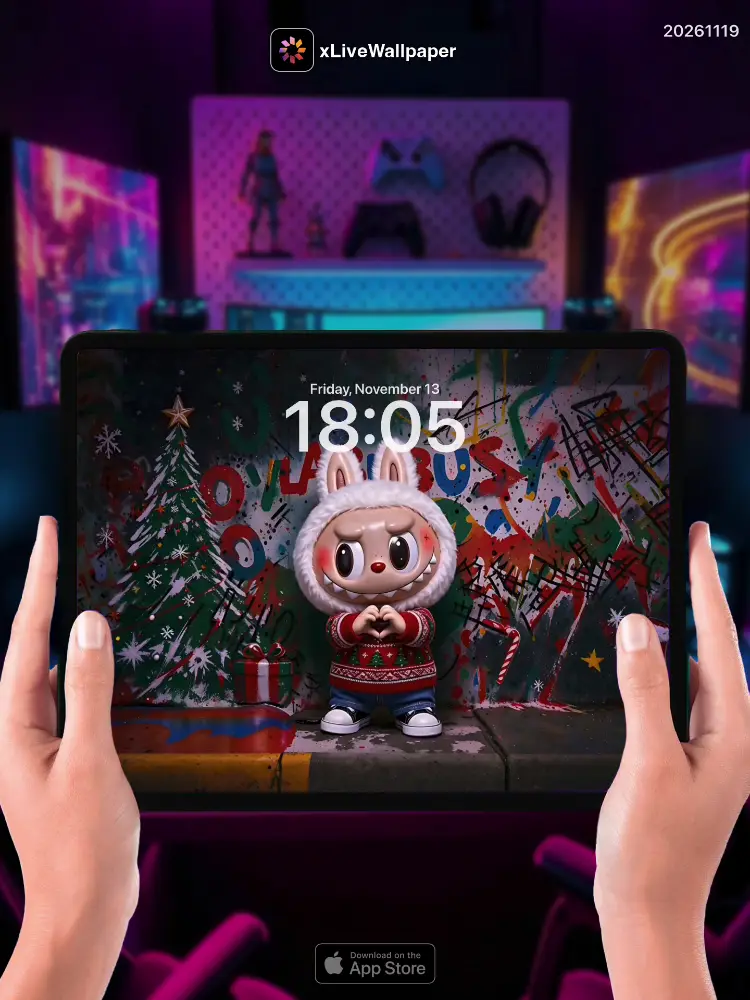
No.20261119 Labubu White Graffiti Wall Pose Live Wallpaper
🤍🎨 Labubu strikes a cool, hip-hop style pose before an enormous graffiti-covered urban wall drenched in bold black outlines and splashes of vivid color — neon pinks, electric blues, sun-yellow tags swirling in chaotic harmony across concrete canvases🖌️。 Her pristine white fur glows like fresh snow under warm street lamps, each strand catching the ambient light so cleanly it seems almost luminescent against the gritty backdrop. One hand rests lazily on her hip while the other lifts a peace sign into the air, sharp teeth peeking out in her trademark mischievous grin as she tilts her head just slightly toward the camera, oversized ears perked and alert to every detail of the scene around her✨。 Behind her, layer upon layer of spray-painted masterpieces blur into an abstraction of urban poetry — layered stencils, dripping paint trails, bold lettering colliding with abstract shapes all merging into one dizzying tapestry of street art energy💙。
🖼️Labubu cool hip-hop pose before giant graffiti wall|Pure white fur glowing under warm streetlights|Peace sign raised, signature sharp-toothed smirk|Layered spray-paint chaos and urban poetry|Dizzying street art energy tapestry behind.
You can now join our live wallpaper club at early-bird price, supporting both Android video and iOS Live Photo formats.
https://locklive.gumroad.com/l/vip
iPad users search ‘20261119’ in xLiveWallpaper App
Download:https://apps.apple.com/app/apple-store/id6747997192?pt=611621&ct=xlivewallpaper&mt=8
#LiveWallpaper #LockLive #xLiveWallpaper #Labubu #White #Graffiti
No.20261119 拉布布 ライブ壁紙 - 白色のグラフィティウォールポーズ
🤍🎨 拉布布在一面巨大的涂鸦覆盖的城市墙壁前摆出酷炫的嘻哈风格姿势,墙面上满是大胆的黑色轮廓和鲜艳的飞溅色彩——霓虹粉、电光蓝、太阳黄色的标签在混凝土画布上以混乱而和谐的方式旋转交织🖌️。她纯白的绒毛在温暖的路灯下如新雪般闪耀,每一根毛丝都清澈地捕捉到环境光线,在粗糙的背景衬托下几乎发出微光。一只手懒洋洋地叉腰,另一只手举出一个和平手势伸向空中,标志性的尖牙从俏皮的咧嘴笑中露出一角,脑袋微微朝镜头倾斜,硕大的耳朵警觉地竖起,关注着场景中的一切细节✨。在她身后,一层又一层的喷漆杰作模糊成了一幅都市诗歌的抽象画面——层叠的模板、滴落的颜料痕迹、大胆的字样与抽象形状碰撞交融,汇聚成一张令人眩晕的街头艺术能量挂毯💙。
🖼️拉布布面对巨型涂鸦墙酷酷嘻哈pose|纯白绒毛在路灯下闪耀|举起和平手势露出招牌尖牙坏笑|层叠喷漆混沌与都市诗歌|背后眩晕的街头艺术能量挂毯。
今なら早期割引価格でライブ壁紙クラブにご参加いただけます。Android ビデオと iOS ライブフォトの両フォーマットに対応しています。
https://locklive.gumroad.com/l/vip
iPad ユーザーはxLiveWallpaperアプリで「20261119」を検索
ダウンロード::https://apps.apple.com/app/apple-store/id6747997192?pt=611621&ct=xlivewallpaper&mt=8
#ライブ壁紙 #LockLive #xLiveWallpaper #ラブブ #ホワイト #グラフィティ
No.20261119 拉布布動態壁紙 - 白色款(塗鴉牆前擺pose)
🤍🎨 拉布布站在一面龐大的城市塗鴉牆前,擺出一個超酷的嘻哈風姿勢,牆上佈滿大膽的黑色輪廓與潑灑而出的鮮豔色彩——霓虹粉紅、電光藍、太陽黃色的標籤凌亂卻和諧地在混凝土畫布上交錯飛舞🖌️。她純淨的白色絨毛被溫暖路燈映照得如同新雪般發光,每一絲絨毛都清晰反射著周圍的光線,在粗礪背景襯托下幾乎泛著自帶的微光。一隻手隨性叉腰,另一隻手高高舉起比了一個「耶」的手勢,標誌性尖牙從調皮的笑容中露出一角,腦袋微微偏向鏡頭方向,大大的圓耳精神抖擻地豎立著,捕捉著場景中的每一個細節✨。她身後,一層又一層的噴漆傑作融合成一幅都市詩意的抽象畫卷——疊加的模板、流瀉的顏料痕跡、霸气的字體與抽象形狀互相衝擊融合,匯聚成一面令人眼花繚亂的街頭藝術能量織錦💙。
🖼️拉布布面對巨型塗鴉牆酷帥嘻哈pose|純白絨毛在路燈下泛光|舉起和平手勢展現招牌壞笑|疊加噴漆混亂與都市詩意|背後令人眼花繚亂的街頭藝術能量織錦。
現在您可以以早鳥價加入我們的動態桌布俱樂部,同時支援 Android 影片與 iOS 實況照片格式。
https://locklive.gumroad.com/l/vip
iPad 用戶在xLiveWallpaper App中搜尋「20261119」
AppStore下載:https://apps.apple.com/app/apple-store/id6747997192?pt=611621&ct=xlivewallpaper&mt=8
#動態壁紙 #LockLive #實況全能王 #Labubu #拉布布 #塗鴉
No.20261119 拉布布动态壁纸 - 白色款(涂鸦墙前摆pose)
🤍🎨 拉布布站在一面庞大的城市涂鸦墙前,摆出一个超酷的嘻哈风姿势,墙上布满大胆的黑色轮廓与泼洒而出的鲜艳色彩——霓虹粉红、电光蓝、太阳黄色的标签凌乱却和谐地在混凝土画布上交错飞舞🖌️。她纯净的白色绒毛被温暖路灯映照得如同新雪般发光,每一丝绒毛都清晰反射着周围的光线,在粗粝背景衬托下几乎泛着自带微光。一只手续性叉腰,另一只手高高举起比了一个”耶”的手势,标志性尖牙从调皮笑容中露出一角,脑袋微微偏向镜头方向,大大的圆耳精神抖擞地竖立着,捕捉着场景中的每一个细���✨。她身后,一层又一层的喷漆杰作融合成一幅都市诗意的抽象画卷——叠加的模板、流泻的颜料痕迹、霸气的字体与抽象形状互相冲击融合,汇聚成一面令人眼花缭乱街头艺术能量织锦💙。
🖼️拉布布面对巨型涂鸦墙酷帅嘻哈pose|纯白绒毛在路灯下泛光|举起和平手势展现招牌坏笑|叠加喷漆混沌与都市诗意|背后令人眼花缭乱的街头艺术能量织锦。
iPad 用户下载 实况全能王 App中搜索「20261119」
#动态壁纸 #LockLive #实况全能王 #LiveWallpaper #xLiveWallpaper #Labubu #拉布布 #白色 #涂鸦
No.20261119 Labubu White Graffiti Wall Pose Live Wallpaper
🤍🎨 ਦਸੁੰਗੋ ਲਾਬੂਬੂ ਇੱਕ ਭਵਰ ਸ਼ਹਿਰੀ ਕੰਧ ਦੇ ਸਾਹਮਣੇ ਇੱਕ ਬਹੁਤ ਹੀ ਕੂਲ, ਹਿਪ-ਹੌਪ ਸਟਾਈਲ pose ਵਿੱਚ ਖੜ੍ਹੀ ਹੈ, ਜੋ ਕਿ ਨੀਓਨ ਪਿੰਕ, ਬਿਜਲੀ ਬਲੂ ਅਤੇ ਸੂਰਜ ਪੀਲੇ ਰੰਗਾਂ ਦੀਆਂ ਗਲੈਡੇ ਟੈਗਾਂ ਨਾਲ ਭਰਪੂਰ ਹੈ, ਜੋ ਬੈਂਕਦਾਰੀ ਵਿੱਚ ਮਨਮਾਨੇ ਤੌਰ ‘ਤੇ ਫੈਲ ਰਹੀ ਹੈ🖌️। ਉਹਦੇ ਸ਼ੁੱਧ ਚਿੱਟੇ ਰੰਗ ਦਾ ਵਾਲ ਉਸਦੇ ਚਾਨਣੀਆਂ ਚਮਕ ਰਹੇ ਹਨ, ਤੇ ਵੀੜ੍ਹੇ ਬਹੁਤ ਵਧੀਆ ਬੈਂਕਦਾਰੀ ਉੱਤੇ ਦਿਖਾਈ ਦਿੰਦਾ ਹੈ। ਇੱਕ ਹੱਥ ਸੁੰਨ ਹੋਣ ਦੇ ਨਾਲ ਢੁਕਿਆ ਹੋਇਆ ਹੈ, ਅਤੇ ਦੂਜਾ ਹੱਥ ਇੱਕ ਦਾਇਰਾ-ਬੱਧ (peace) ਸਾਈਨ ਹਵਾ ਵਿੱਚ ਚੁੱਕਿਆ ਹੋਇਆ ਹੈ, ਜਿਸ ‘ਤੇ ਉਹਦੇ ਨੁਕਦਾਰ দাঁত ਪ੍ਰਗਟ ਹੋ ਰਹੇ ਹਨ, ਜਦੋਂ ਕਿ ਉਹ ਆਪਣੇ ਸਿਰ ਨੂੰ ਥੋੜਾ ਸਾਹਮਣੇ ਕਰਦੀ ਹੈ ਅਤੇ ਉਸਦੇ ਵੱਡੇ ਕੰਨ ਸਹਿਤ ਚੌਂਕੀ ਰਹਿੰਦੇ ਹਨ✨। ਉਹਦੇ ਪਿੱਛੇ, ਸਪਰੇ ਪੇਂਟ ਦੀਆਂ ਕਈ ਪਰਤਾਂ ਇੱਕ ਸ਼ਹਿਰੀ ਕਵਿਤਾ ਦੇ ਰੂਪ ਵਿੱਚ ਆਪਸ ਵਿੱਚ ਘੁਲ ਜਾਂਦੀਆਂ ਹਨ, ਇੱਕ ਧੁੰਦਲੀ ਸਟ੍ਰੀਟ ਆਰਟ ਊਰਜਾ ਦੀ ਪਟਾਈ ਬਣਾਉਂਦੇ ਹੋਏ💙।
| 🖼️ਲਾਬੂਬੂ ਬਹੁਤ ਵੱਡੀ ਗ੍ਰੈਫਿਟੀ ਕੰਧ ਸਾਹਮਣੇ ਕੂਲ pose | ਸ਼ੁੱਧ ਚਿੱਟਾ ਵਾਲ ਬੱਤੀਆਂ ਹੇਠਾਂ ਚਮਕਦੇ | ਦਾਇਰਾ-ਬੱਧ ਸਾਈਨ ਨੁਕਦਾਰ ਦਾਤਾਂ ਨਾਲ | ਸ਼ਹਿਰੀ ਕਵਿਤਾ ਦੇ ਧੁੰਦਲੇ ਪੇਂਟ | ਅੱਖਾਂ ਮੀਚੀ ਸਟ੍ਰੀਟ ਆਰਟ ਊਰਜਾ ਪਟਾਈ। |
अब आप हमारे लाइव वॉलपेपर क्लब में आर्ली बर्ड कीमत पर शामिल हो सकते हैं, जो Android वीडियो और iOS लाइव फोटो प्रारूपों दोनों का समर्थन करता है।
https://locklive.gumroad.com/l/vip
iPad उपयोगकर्ताओं को xLiveWallpaper ऐप में ‘20261119’ खोजें
Download:https://apps.apple.com/app/apple-store/id6747997192?pt=611621&ct=xlivewallpaper&mt=8
#LiveWallpaper #LockLive #xLiveWallpaper #Labubu #White #Graffiti
安卓與iPhone動態桌布設定速成指南
下載準備
在本網站選擇喜愛的動態桌布後:
- 安卓用戶:下載MP4格式影片檔
- iPhone用戶:下載Live Photo實況格式
安卓設定步驟(影片檔)
- 下載完成後,進入手機「檔案管理」
- 找到下載的影片檔,長按選擇「設為桌布」
- 或使用第三方應用:安裝「壁纸引擎」「Android版 Wallpaper Engine」應用程式,從應用內選擇本網站下載的影片檔
- 調整設定:建議開啟循環播放,可選擇靜音節省耗電
- 套用完成:選擇設為主畫面或鎖定畫面
iPhone設定步驟(實況格式)
- 匯入檔案:透過 OneDrive 手机應用或 AirDrop 傳到iPhone
- 開啟「照片」應用:找到匯入的實況照片
- 點擊分享圖示 → 選擇「用作背景圖片」
- 調整位置後點擊「設定」
- 重要:進入「設定」>「背景圖片」,確認「原況照片」選項已開啟
- 鎖定畫面下重壓螢幕即可看到動態效果
效能提示
- 安卓旗艦機型可選4K畫質,舊機型建議使用1080p
- iPhone機型仅支援使用1080p
- iPhone機型仅支援使用1-2秒
- iPhone低電量時建議暫停使用動態桌布
- 深色系桌布較節省電力(特別適合OLED螢幕)
本網站特色
- 每週更新獨家動態桌布
- 提供雙平台專用格式
- 檔案已優化,兼顧品質與效能
立即下載,讓您的手機主畫面與眾不同!
Quick Guide to Setting Live Wallpapers on Android & iPhone
Download Preparation
After selecting your favorite live wallpaper on this website:
- Android Users: Download the video file in MP4 format
- iPhone Users: Download the file in Live Photo format
Android Setup Steps (Video File)
- After downloading, open the File Manager on your phone
- Locate the downloaded video file, long-press it and select Set as Wallpaper
- Or use a third-party app: Install applications like Wallpaper Engine or Wallpaper Engine for Android, then select the downloaded video file from within the app
- Adjust settings: It is recommended to enable loop playback, and you can choose to mute the audio to save battery power
- Once applied: Select to set it as the home screen wallpaper or lock screen wallpaper
iPhone Setup Steps (Live Photo Format)
- Import the file: Transfer it to your iPhone via the OneDrive mobile app or AirDrop
- Open the Photos app: Locate the imported Live Photo
- Tap the share icon → Select Use as Wallpaper
- Adjust the position and then tap Set
- Important Note: Go to Settings > Wallpaper and make sure the Live Photo option is enabled
- Press firmly on the screen when it is locked to see the live effect
Performance Tips
- Flagship Android models can support 4K resolution; for older models, 1080p is recommended
- iPhone models only support 1080p resolution
- iPhone models only support Live Photos of 1-2 seconds in length
- It is recommended to pause using live wallpapers when your iPhone is in low battery mode
- Dark-themed wallpapers are more power-efficient (especially suitable for OLED screens)
Website Features
- Exclusive live wallpapers updated weekly
- Specialized formats provided for both platforms
- Optimized files that balance quality and performance
Download now to make your phone's home screen stand out from the crowd!