 xLiveWallpaper
Demon Slayer Kyojuro Rengoku Atmosphere Live Wallpaper
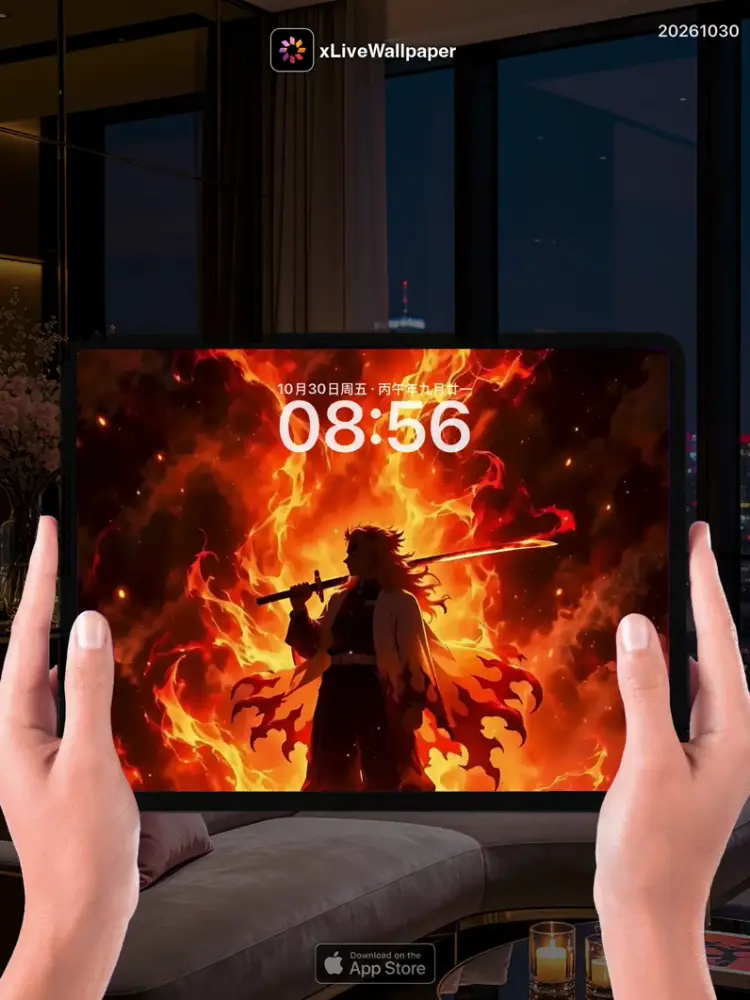
No.20261030 Demon Slayer Kyojuro Rengoku Atmosphere Live Wallpaper
🔥Kyojuro Rengoku—Flame Hashira—boils with contained fire, his golden eyes blazing like twin suns behind the furrowed brows that never seem to rest. His flame-patterned haori flares upward as if caught in an updraft, the black-and-crimson edges curling like living tongues of fire⚡. In the live wallpaper heat shimmer radiates from his silhouette, a low rumble echoing from his chest as though every word he speaks carries the weight of thunder—「My heart burns bright!」—and even when he stands perfectly still, you can feel the inferno coiled beneath his ribs, ready to erupt at a moment’s notice✿.
🖼️Kyojuro boiling with contained fire|Golden eyes blazing like twin suns|Flame-patterned haori flaring upward|Heat shimmer radiating from his silhouette|Low rumble echoing from his chest|「My heart burns bright!」 carried on thunder|Inferno coiled beneath ribs, ready to erupt.
You can now join our live wallpaper club at early-bird price, supporting both Android video and iOS Live Photo formats.
https://locklive.gumroad.com/l/vip
iPad users search ‘20261030’ in xLiveWallpaper App
Download:https://apps.apple.com/app/apple-store/id6747997192?pt=611621&ct=xlivewallpaper&mt=8
#LiveWallpaper #LockLive #xLiveWallpaper #DemonSlayer #Anime
No.20261030 鬼灭之刃 炼狱杏寿郎 动态壁纸
🔥炎柱·炼狱杏寿郎体内燃烧着蓄势待发的火焰,金色双瞳如两颗小太阳在眉宇间灼灼燃烧,从未有过一刻停歇。焰纹羽织向上翻卷,仿佛被热浪掀动,黑红边缘如活焰般翻卷摇曳⚡。在动态壁纸里热浪从他的剪影中辐射而出,低沉的雷鸣从他胸腔深处回响——仿佛他说出的每一个字都裹挟着雷霆万钧之力:”我的心燃烧得比任何时候都要炽烈!”——即使他静止不动,你也能感受到肋骨之下那团即将爆发的怒火✿。
🖼️蓄势待发火焰的炼狱杏寿郎|金色双瞳如两颗小太阳灼灼燃烧|焰纹羽织被热浪掀动翻卷|热浪从剪影中辐射而出|雷鸣从胸腔深处回响|字字裹挟雷霆万钧之力:”心燃烧最炽烈!”|肋骨之下怒火即将爆发。
iPad 用户下载 实况全能王 App中搜索「20261030」
#动态壁纸 #LockLive #实况全能王 #LiveWallpaper #xLiveWallpaper #鬼灭之刃 #动漫
No.20261030 Demon Slayer Kyojuro Rengoku Atmosphere Live Wallpaper
🔥炎柱・煉獄杏壽郎體內燃燒著蓄勢待發的火焰,金色雙瞳如兩顆小太陽在眉宇間灼灼燃燒,從未有一刻停歇。焰紋羽織向上翻捲,彷彿被熱浪掀動,黑紅邊緣如活焰般翻卷搖曳⚡。在動態壁紙裡熱浪從他的剪影中輻射而出,低沉的雷鳴從他胸膛深處迴響——彷彿他說出的每一個字都裹挾著雷霆萬鈞之力:「我的心燃燒得比任何時候都要熾烈!」——即使他靜止不動,你也能感受到肋骨之下那團即將爆發的怒火✿。
🖼️蓄勢待發火焰的煉獄杏壽郎|金色雙瞳如兩顆小太陽灼灼燃燒|焰紋羽織被熱浪掀動翻捲|熱浪從剪影中輻射而出|雷鳴從胸膛深處迴響|字字裹挾雷霆萬鈞之力:「心燃燒最熾烈!」|肋骨之下怒火即將爆發。
現在您可以以早鳥價加入我們的動態桌布俱樂部,同時支援 Android 影片與 iOS 實況照片格式。
https://locklive.gumroad.com/l/vip
iPad 用戶在xLiveWallpaper App中搜尋「20261030」
AppStore下載:https://apps.apple.com/app/apple-store/id6747997192?pt=611621&ct=xlivewallpaper&mt=8
#動態壁紙 #LockLive #實況全能王 #LiveWallpaper #xLiveWallpaper #鬼滅之刃 #動漫
No.20261030 Demon Slayer Kyojuro Rengoku Atmosphere Live Wallpaper
🔥炎柱・煉獄杏壽郎は内に秘めた火焔を滾らせ、金色の瞳は二つの太陽のように眉間から焼き尽くさんばかりに輝き、決して休むことを知らぬ眼差し⚡。炎模様のはorienが上昇気流に翻って黒と紅色の縁が生きる炎の舌のように蠢き、ライブ壁紙では熱波がシルエットから放射し、低く唸る雷鳴が胸の奥からこだまする——彼の言葉すべてが雷霆の重みを帯びているかの如く「我が心は燃え盛る!」✿。
🖼️内に秘めた火焔を滾らせる煉獄杏壽郎|金色の瞳が二つの太陽のように輝く|炎模様のはorienが上昇気流に翻る|熱波がシルエットから放射|胸の奥から低く唸る雷鳴|雷霆の重みを帯びた言葉:「我が心は燃え盛る!」|肋骨の下で爆発を待つ烈火。
今なら早期割引価格でライブ壁紙クラブにご参加いただけます。Android ビデオと iOS ライブフォトの両フォーマットに対応しています。
https://locklive.gumroad.com/l/vip
iPad ユーザーはxLiveWallpaperアプリで「20261030」を検索
ダウンロード::https://apps.apple.com/app/apple-store/id6747997192?pt=611621&ct=xlivewallpaper&mt=8
#ライブ壁紙 #LockLive #xLiveWallpaper #DemonSlayer #アニメ
安卓與iPhone動態桌布設定速成指南
下載準備
在本網站選擇喜愛的動態桌布後:
- 安卓用戶:下載MP4格式影片檔
- iPhone用戶:下載Live Photo實況格式
安卓設定步驟(影片檔)
- 下載完成後,進入手機「檔案管理」
- 找到下載的影片檔,長按選擇「設為桌布」
- 或使用第三方應用:安裝「壁纸引擎」「Android版 Wallpaper Engine」應用程式,從應用內選擇本網站下載的影片檔
- 調整設定:建議開啟循環播放,可選擇靜音節省耗電
- 套用完成:選擇設為主畫面或鎖定畫面
iPhone設定步驟(實況格式)
- 匯入檔案:透過 OneDrive 手机應用或 AirDrop 傳到iPhone
- 開啟「照片」應用:找到匯入的實況照片
- 點擊分享圖示 → 選擇「用作背景圖片」
- 調整位置後點擊「設定」
- 重要:進入「設定」>「背景圖片」,確認「原況照片」選項已開啟
- 鎖定畫面下重壓螢幕即可看到動態效果
效能提示
- 安卓旗艦機型可選4K畫質,舊機型建議使用1080p
- iPhone機型仅支援使用1080p
- iPhone機型仅支援使用1-2秒
- iPhone低電量時建議暫停使用動態桌布
- 深色系桌布較節省電力(特別適合OLED螢幕)
本網站特色
- 每週更新獨家動態桌布
- 提供雙平台專用格式
- 檔案已優化,兼顧品質與效能
立即下載,讓您的手機主畫面與眾不同!
Quick Guide to Setting Live Wallpapers on Android & iPhone
Download Preparation
After selecting your favorite live wallpaper on this website:
- Android Users: Download the video file in MP4 format
- iPhone Users: Download the file in Live Photo format
Android Setup Steps (Video File)
- After downloading, open the File Manager on your phone
- Locate the downloaded video file, long-press it and select Set as Wallpaper
- Or use a third-party app: Install applications like Wallpaper Engine or Wallpaper Engine for Android, then select the downloaded video file from within the app
- Adjust settings: It is recommended to enable loop playback, and you can choose to mute the audio to save battery power
- Once applied: Select to set it as the home screen wallpaper or lock screen wallpaper
iPhone Setup Steps (Live Photo Format)
- Import the file: Transfer it to your iPhone via the OneDrive mobile app or AirDrop
- Open the Photos app: Locate the imported Live Photo
- Tap the share icon → Select Use as Wallpaper
- Adjust the position and then tap Set
- Important Note: Go to Settings > Wallpaper and make sure the Live Photo option is enabled
- Press firmly on the screen when it is locked to see the live effect
Performance Tips
- Flagship Android models can support 4K resolution; for older models, 1080p is recommended
- iPhone models only support 1080p resolution
- iPhone models only support Live Photos of 1-2 seconds in length
- It is recommended to pause using live wallpapers when your iPhone is in low battery mode
- Dark-themed wallpapers are more power-efficient (especially suitable for OLED screens)
Website Features
- Exclusive live wallpapers updated weekly
- Specialized formats provided for both platforms
- Optimized files that balance quality and performance
Download now to make your phone's home screen stand out from the crowd!