 xLiveWallpaper
Dragon Ball Team Three Live Wallpaper
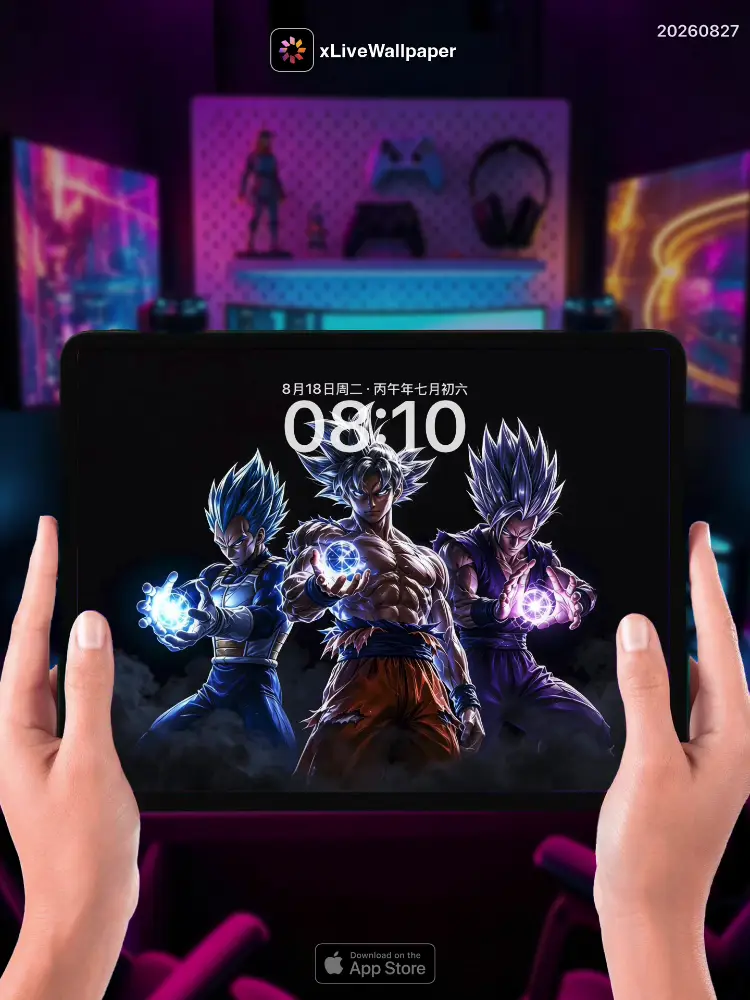
No.20260827 Dragon Ball Team Three Live Wallpaper
⚡Goku, Gohan, and Piccolo stand back-to-back on the shattered battlefield, their golden auras blazing against the apocalyptic sky🌟. Goku’s Super Saiyan hair crackles with raw power, his signature Kamehameha already gathering energy in his open palms🔵. Behind him, Gohan’s potential unleashes in his Ultimate form, the Saiyan warrior’s eyes burning with the fire of both father and mother’s teachings🔥. Piccolo’s Namekian green skin gleams with battle-ready determination, his arms crossed as he channels his massive energy for a Special Beam Cannon⚡. The ground beneath them is scorched and cracked from countless battles, while energy blasts ripple through the sky from the fierce combat raging around them💥. This wallpaper captures the legendary bond between mentor and student across generations, three warriors whose combined power has saved the universe countless times🐉.
🖼️Goku’s golden Super Saiyan aura blazing|Gohan’s Ultimate form unleashed|Piccolo’s Namekian green skin with crossed arms|Kamehameha gathering energy|Special Beam Cannon forming|Shattered battlefield under apocalyptic sky.
You can now join our live wallpaper club at early-bird price, supporting both Android video and iOS Live Photo formats.
https://locklive.gumroad.com/l/vip
iPad users search ‘20260827’ in xLiveWallpaper App
Download:https://apps.apple.com/app/apple-store/id6747997192?pt=611621&ct=xlivewallpaper&mt=8
#LockLive #xLiveWallpaper #LiveWallpaper #DragonBall #TeamThree #Anime #Saiyan
No.20260827 七龙珠 三人小队 动态壁纸
⚡孙悟空、悟饭和比克并肩站在破碎的战场上,他们金色的气焰在末日般的天空下燃烧🌟。悟空的超级赛亚人头发闪烁着原始的力量,标志性的龟派气功已在张开的双掌中聚集能量🔵。在他身后,悟饭的潜能以完全体形式释放,赛亚人战士的眼中燃烧着父亲和母亲教导的火焰🔥。比克的那美克星绿色皮肤闪耀着战斗的准备,双臂交叉,引导着巨大的能量形成魔贯光炮⚡。他们脚下的大地因无数次战斗而焦黑龟裂,而能量波动则从他们周围激烈的战斗中 ripple 向天空💥。这张壁纸捕捉了导师与学生跨世代的传奇羁绊,三位战士的组合力量已无数次拯救了宇宙🐉。
🖼️悟空金色超级赛亚人气焰燃烧|悟饭完全体释放|比克那美克星绿色皮肤双臂交叉|龟派气功聚集能量|魔贯光炮形成|末日天空下破碎的战场。
iPad 用户下载 实况全能王 App中搜索「20260827」
#LockLive #实况全能王 #LiveWallpaper #xLiveWallpaper #七龙珠 #三人小队 #动漫 #赛亚人
安卓與iPhone動態桌布設定速成指南
下載準備
在本網站選擇喜愛的動態桌布後:
- 安卓用戶:下載MP4格式影片檔
- iPhone用戶:下載Live Photo實況格式
安卓設定步驟(影片檔)
- 下載完成後,進入手機「檔案管理」
- 找到下載的影片檔,長按選擇「設為桌布」
- 或使用第三方應用:安裝「壁纸引擎」「Android版 Wallpaper Engine」應用程式,從應用內選擇本網站下載的影片檔
- 調整設定:建議開啟循環播放,可選擇靜音節省耗電
- 套用完成:選擇設為主畫面或鎖定畫面
iPhone設定步驟(實況格式)
- 匯入檔案:透過 OneDrive 手机應用或 AirDrop 傳到iPhone
- 開啟「照片」應用:找到匯入的實況照片
- 點擊分享圖示 → 選擇「用作背景圖片」
- 調整位置後點擊「設定」
- 重要:進入「設定」>「背景圖片」,確認「原況照片」選項已開啟
- 鎖定畫面下重壓螢幕即可看到動態效果
效能提示
- 安卓旗艦機型可選4K畫質,舊機型建議使用1080p
- iPhone機型仅支援使用1080p
- iPhone機型仅支援使用1-2秒
- iPhone低電量時建議暫停使用動態桌布
- 深色系桌布較節省電力(特別適合OLED螢幕)
本網站特色
- 每週更新獨家動態桌布
- 提供雙平台專用格式
- 檔案已優化,兼顧品質與效能
立即下載,讓您的手機主畫面與眾不同!
Quick Guide to Setting Live Wallpapers on Android & iPhone
Download Preparation
After selecting your favorite live wallpaper on this website:
- Android Users: Download the video file in MP4 format
- iPhone Users: Download the file in Live Photo format
Android Setup Steps (Video File)
- After downloading, open the File Manager on your phone
- Locate the downloaded video file, long-press it and select Set as Wallpaper
- Or use a third-party app: Install applications like Wallpaper Engine or Wallpaper Engine for Android, then select the downloaded video file from within the app
- Adjust settings: It is recommended to enable loop playback, and you can choose to mute the audio to save battery power
- Once applied: Select to set it as the home screen wallpaper or lock screen wallpaper
iPhone Setup Steps (Live Photo Format)
- Import the file: Transfer it to your iPhone via the OneDrive mobile app or AirDrop
- Open the Photos app: Locate the imported Live Photo
- Tap the share icon → Select Use as Wallpaper
- Adjust the position and then tap Set
- Important Note: Go to Settings > Wallpaper and make sure the Live Photo option is enabled
- Press firmly on the screen when it is locked to see the live effect
Performance Tips
- Flagship Android models can support 4K resolution; for older models, 1080p is recommended
- iPhone models only support 1080p resolution
- iPhone models only support Live Photos of 1-2 seconds in length
- It is recommended to pause using live wallpapers when your iPhone is in low battery mode
- Dark-themed wallpapers are more power-efficient (especially suitable for OLED screens)
Website Features
- Exclusive live wallpapers updated weekly
- Specialized formats provided for both platforms
- Optimized files that balance quality and performance
Download now to make your phone's home screen stand out from the crowd!