 xLiveWallpaper
Jujutsu Kaisen Team Three Live Wallpaper
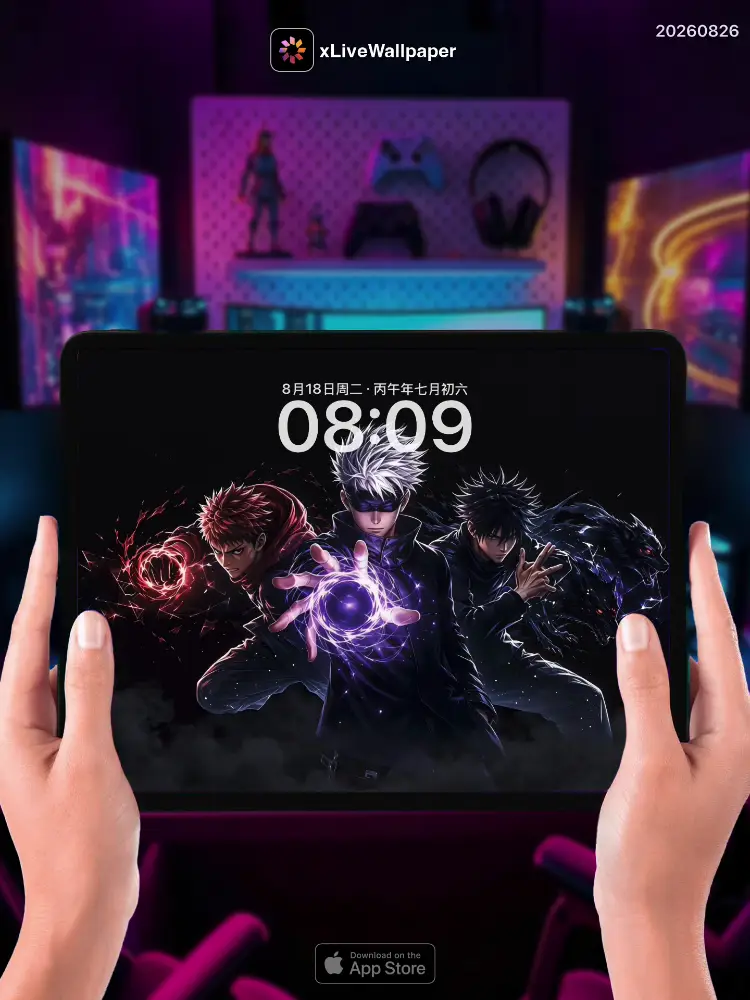
No.20260826 Jujutsu Kaisen Team Three Live Wallpaper
🌀Yuji, Megumi, and Nobara stand united on the ruins of a cursed battleground, their cursed energy rippling through the darkened sky🌑. Yuji’s massive fists glow with raw cursed energy as he prepares to unleash another Black Flash⚡. Megumi’s shadow technique erupts from the ground, summoning Nue’s wings to shield his allies from incoming attacks🐦⬛. Nobara’s straw doll quivers with power, wooden stakes already planted in the earth ready to pierce through any curse that dares approach💀. Behind them, the twisted architecture of modern Tokyo collides with ancient cursed energy, creating a surreal battlefield where the living and cursed spirits clash⚔️. This wallpaper captures the unbreakable bond of three jujutsu sorcerers who fight together against the darkness that threatens to consume the world🔥.
🖼️Yuji’s cursed-energy-glowing fists|Megumi summoning Nue from shadows|Nobara’s quivering straw doll with stakes|Darkened cursed battlefield|Twisted Tokyo architecture|Ancient and modern energy collision.
You can now join our live wallpaper club at early-bird price, supporting both Android video and iOS Live Photo formats.
https://locklive.gumroad.com/l/vip
iPad users search ‘20260826’ in xLiveWallpaper App
Download:https://apps.apple.com/app/apple-store/id6747997192?pt=611621&ct=xlivewallpaper&mt=8
#LockLive #xLiveWallpaper #LiveWallpaper #JujutsuKaisen #TeamThree #Anime #Curses
No.20260826 咒术回战 三人小队 动态壁纸
🌀伏黑惠、钉崎野蔷薇和虎杖悠仁并肩站在咒术战场的废墟上,他们的咒力在黑暗的天空中翻涌🌑。虎杖的巨拳闪烁着原始咒力光芒,准备释放下一次黑闪⚡。伏黑的阴影术从地面爆发,召唤出鹰枭的翅膀为同伴遮挡来袭的攻击🐦⬛。钉崎的稻草人因力量而颤抖,木桩已插在大地中,准备穿透任何敢于靠近的诅咒💀。在他们身后,现代东京的扭曲建筑与古老咒力交汇,创造了一个现实与诅咒生物激烈碰撞的超现实战场⚔️。这张壁纸捕捉了三位术士牢不可破的羁绊,他们并肩作战对抗威胁世界的黑暗🔥。
🖼️虎杖咒力闪烁的巨拳|伏黑从阴影召唤鹰枭|钉崎颤抖的稻草人与木桩|黑暗咒术战场|扭曲的东京建筑|古老与现代咒力交汇。
iPad 用户下载 实况全能王 App中搜索「20260826」
#LockLive #实况全能王 #LiveWallpaper #xLiveWallpaper #咒术回战 #三人小队 #动漫 #咒术
安卓與iPhone動態桌布設定速成指南
下載準備
在本網站選擇喜愛的動態桌布後:
- 安卓用戶:下載MP4格式影片檔
- iPhone用戶:下載Live Photo實況格式
安卓設定步驟(影片檔)
- 下載完成後,進入手機「檔案管理」
- 找到下載的影片檔,長按選擇「設為桌布」
- 或使用第三方應用:安裝「壁纸引擎」「Android版 Wallpaper Engine」應用程式,從應用內選擇本網站下載的影片檔
- 調整設定:建議開啟循環播放,可選擇靜音節省耗電
- 套用完成:選擇設為主畫面或鎖定畫面
iPhone設定步驟(實況格式)
- 匯入檔案:透過 OneDrive 手机應用或 AirDrop 傳到iPhone
- 開啟「照片」應用:找到匯入的實況照片
- 點擊分享圖示 → 選擇「用作背景圖片」
- 調整位置後點擊「設定」
- 重要:進入「設定」>「背景圖片」,確認「原況照片」選項已開啟
- 鎖定畫面下重壓螢幕即可看到動態效果
效能提示
- 安卓旗艦機型可選4K畫質,舊機型建議使用1080p
- iPhone機型仅支援使用1080p
- iPhone機型仅支援使用1-2秒
- iPhone低電量時建議暫停使用動態桌布
- 深色系桌布較節省電力(特別適合OLED螢幕)
本網站特色
- 每週更新獨家動態桌布
- 提供雙平台專用格式
- 檔案已優化,兼顧品質與效能
立即下載,讓您的手機主畫面與眾不同!
Quick Guide to Setting Live Wallpapers on Android & iPhone
Download Preparation
After selecting your favorite live wallpaper on this website:
- Android Users: Download the video file in MP4 format
- iPhone Users: Download the file in Live Photo format
Android Setup Steps (Video File)
- After downloading, open the File Manager on your phone
- Locate the downloaded video file, long-press it and select Set as Wallpaper
- Or use a third-party app: Install applications like Wallpaper Engine or Wallpaper Engine for Android, then select the downloaded video file from within the app
- Adjust settings: It is recommended to enable loop playback, and you can choose to mute the audio to save battery power
- Once applied: Select to set it as the home screen wallpaper or lock screen wallpaper
iPhone Setup Steps (Live Photo Format)
- Import the file: Transfer it to your iPhone via the OneDrive mobile app or AirDrop
- Open the Photos app: Locate the imported Live Photo
- Tap the share icon → Select Use as Wallpaper
- Adjust the position and then tap Set
- Important Note: Go to Settings > Wallpaper and make sure the Live Photo option is enabled
- Press firmly on the screen when it is locked to see the live effect
Performance Tips
- Flagship Android models can support 4K resolution; for older models, 1080p is recommended
- iPhone models only support 1080p resolution
- iPhone models only support Live Photos of 1-2 seconds in length
- It is recommended to pause using live wallpapers when your iPhone is in low battery mode
- Dark-themed wallpapers are more power-efficient (especially suitable for OLED screens)
Website Features
- Exclusive live wallpapers updated weekly
- Specialized formats provided for both platforms
- Optimized files that balance quality and performance
Download now to make your phone's home screen stand out from the crowd!