 xLiveWallpaper
Demon Slayer Team Three Live Wallpaper
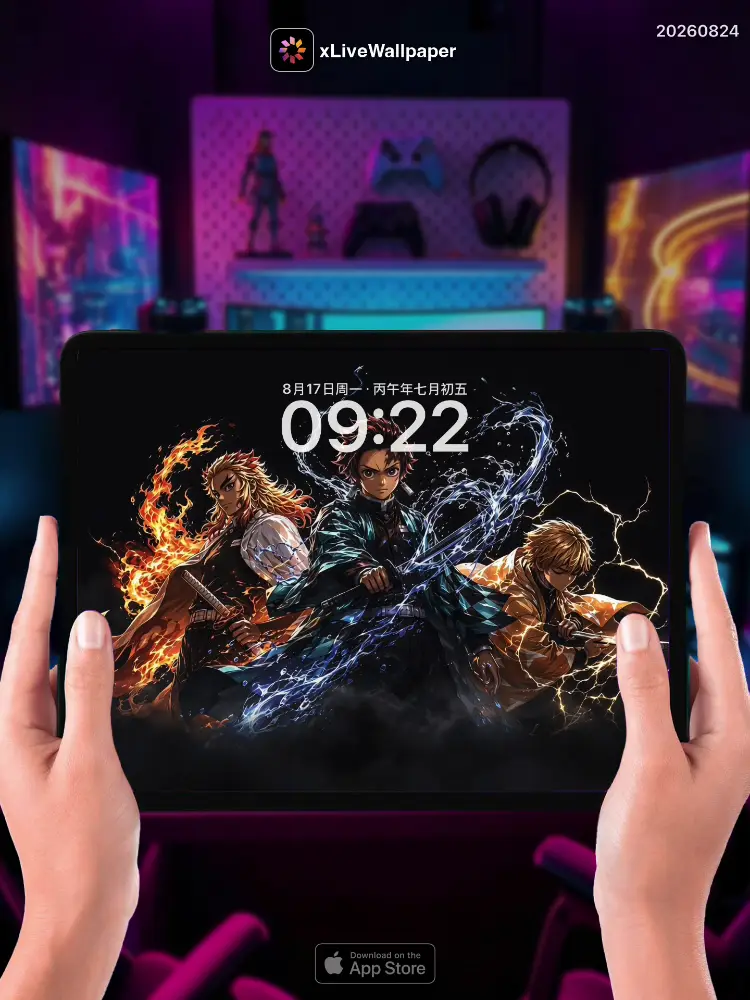
No.20260824 Demon Slayer Team Three Live Wallpaper
⚔️Tanjiro, Zenitsu, and Inosuke stand united on a blood-stained battlefield, their breathing techniques creating visible ripples in the misty air🌫️. Tanjiro’s Nichirin blade glows a fierce black-red, water and flame patterns dancing along its edge as he prepares Water Breathing Tenth Form💧. Zenitsu’s yellow hair crackles with lightning, his eyes closed in concentration as Thunder Breathing charges through his limbs ready for Godspeed⚡. Inosuke charges forward with his serrated twin blades, Beast Breathing’s wild aura swirling around his boar mask as he roars into the night🐗. Behind them, the moon breaks through clouds illuminating the ruins of a demon-ravaged village, while distant cries of battle echo through the mountains🌙. This wallpaper captures the unbreakable bond of three warriors who fight not for glory, but to protect humanity’s tomorrow🔥.
🖼️Tanjiro’s black-red Nichirin blade glowing|Zenitsu’s lightning-charged hair|Inosuke’s twin serrated blades|Misty battlefield with blood stains|Moon breaking through clouds|Demon-ravaged village ruins.
You can now join our live wallpaper club at early-bird price, supporting both Android video and iOS Live Photo formats.
https://locklive.gumroad.com/l/vip
iPad users search ‘20260824’ in xLiveWallpaper App
Download:https://apps.apple.com/app/apple-store/id6747997192?pt=611621&ct=xlivewallpaper&mt=8
#LockLive #xLiveWallpaper #LiveWallpaper #DemonSlayer #TeamThree #Anime #KimetsuNoYaiba
No.20260824 鬼灭之刃 三人小队 动态壁纸
⚔️炭治郎、善逸和伊之助并肩站在血迹斑斑的战场上,他们的呼吸法在雾蒙蒙的空气中形成可见的涟漪🌫️。炭治郎的日轮刀闪耀着黑红色的光芒,水与火的图案沿着刀刃舞动,他正准备施展水之呼吸第十式💧。善逸的黄色头发闪烁着闪电,双眼紧闭集中精神,雷之呼吸通过他的四肢充能,准备施展神速⚡。伊之助挥舞着锯齿状的双刀冲向前方,兽之呼吸的狂野气息围绕在他的野猪面具周围,对着夜空咆哮🐗。在他们身后,月亮冲破云层,照亮了被鬼蹂躏的村庄废墟,而远处的战斗呐喊声在山间回响🌙。这张壁纸捕捉了三位战士牢不可破的羁绊,他们战斗不是为了荣耀,而是为了保护人类的明天🔥。
🖼️炭治郎闪耀黑红色光芒的日轮刀|善逸闪电充能的头发|伊之助锯齿状的双刀|血迹斑斑的雾蒙蒙战场|冲破云层的月亮|被鬼蹂躏的村庄废墟。
iPad 用户下载 实况全能王 App中搜索「20260824」
#LockLive #实况全能王 #LiveWallpaper #xLiveWallpaper #鬼灭之刃 #三人小队 #动漫 #鬼灭
安卓與iPhone動態桌布設定速成指南
下載準備
在本網站選擇喜愛的動態桌布後:
- 安卓用戶:下載MP4格式影片檔
- iPhone用戶:下載Live Photo實況格式
安卓設定步驟(影片檔)
- 下載完成後,進入手機「檔案管理」
- 找到下載的影片檔,長按選擇「設為桌布」
- 或使用第三方應用:安裝「壁纸引擎」「Android版 Wallpaper Engine」應用程式,從應用內選擇本網站下載的影片檔
- 調整設定:建議開啟循環播放,可選擇靜音節省耗電
- 套用完成:選擇設為主畫面或鎖定畫面
iPhone設定步驟(實況格式)
- 匯入檔案:透過 OneDrive 手机應用或 AirDrop 傳到iPhone
- 開啟「照片」應用:找到匯入的實況照片
- 點擊分享圖示 → 選擇「用作背景圖片」
- 調整位置後點擊「設定」
- 重要:進入「設定」>「背景圖片」,確認「原況照片」選項已開啟
- 鎖定畫面下重壓螢幕即可看到動態效果
效能提示
- 安卓旗艦機型可選4K畫質,舊機型建議使用1080p
- iPhone機型仅支援使用1080p
- iPhone機型仅支援使用1-2秒
- iPhone低電量時建議暫停使用動態桌布
- 深色系桌布較節省電力(特別適合OLED螢幕)
本網站特色
- 每週更新獨家動態桌布
- 提供雙平台專用格式
- 檔案已優化,兼顧品質與效能
立即下載,讓您的手機主畫面與眾不同!
Quick Guide to Setting Live Wallpapers on Android & iPhone
Download Preparation
After selecting your favorite live wallpaper on this website:
- Android Users: Download the video file in MP4 format
- iPhone Users: Download the file in Live Photo format
Android Setup Steps (Video File)
- After downloading, open the File Manager on your phone
- Locate the downloaded video file, long-press it and select Set as Wallpaper
- Or use a third-party app: Install applications like Wallpaper Engine or Wallpaper Engine for Android, then select the downloaded video file from within the app
- Adjust settings: It is recommended to enable loop playback, and you can choose to mute the audio to save battery power
- Once applied: Select to set it as the home screen wallpaper or lock screen wallpaper
iPhone Setup Steps (Live Photo Format)
- Import the file: Transfer it to your iPhone via the OneDrive mobile app or AirDrop
- Open the Photos app: Locate the imported Live Photo
- Tap the share icon → Select Use as Wallpaper
- Adjust the position and then tap Set
- Important Note: Go to Settings > Wallpaper and make sure the Live Photo option is enabled
- Press firmly on the screen when it is locked to see the live effect
Performance Tips
- Flagship Android models can support 4K resolution; for older models, 1080p is recommended
- iPhone models only support 1080p resolution
- iPhone models only support Live Photos of 1-2 seconds in length
- It is recommended to pause using live wallpapers when your iPhone is in low battery mode
- Dark-themed wallpapers are more power-efficient (especially suitable for OLED screens)
Website Features
- Exclusive live wallpapers updated weekly
- Specialized formats provided for both platforms
- Optimized files that balance quality and performance
Download now to make your phone's home screen stand out from the crowd!