 xLiveWallpaper
Genshin Impact Neuvillette Live Wallpaper
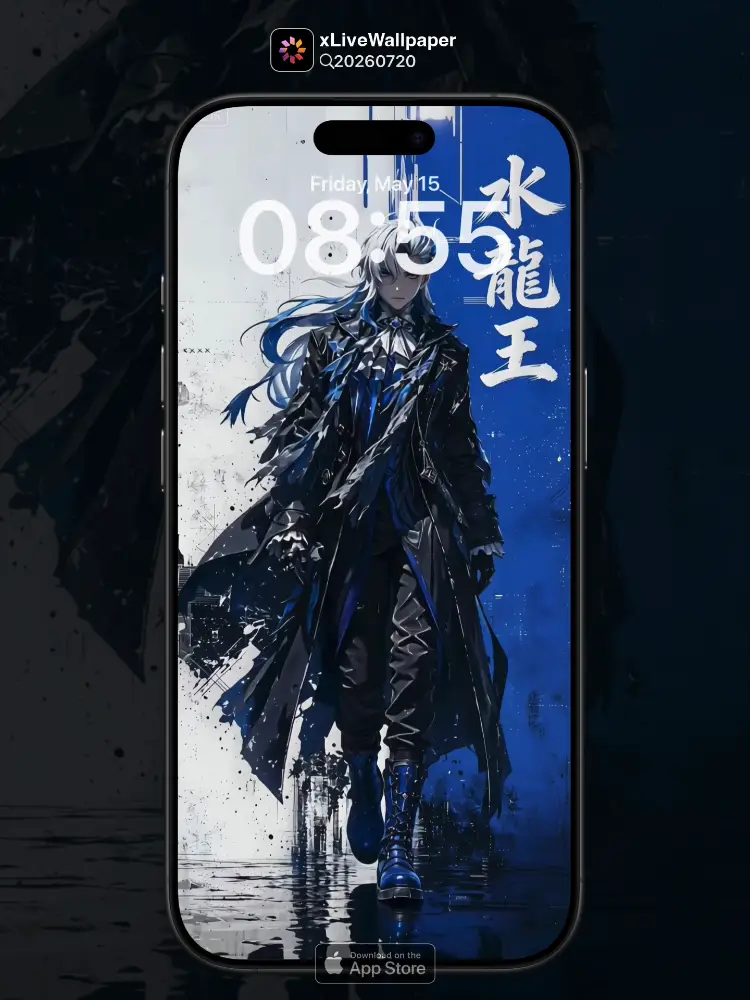
No.20260720 Genshin Impact Neuvillette (Cool Neuvillette on Graffiti Background Wall)
💧 Neuvillette stands elegantly against a vibrant graffiti wall, his Hydro power flowing like water. The colorful street art contrasts with his sophisticated blue attire, creating a stunning fusion of noble grace and modern urban energy.
You can now join our live wallpaper club at early-bird price, supporting both Android video and iOS Live Photo formats.
https://locklive.gumroad.com/l/vip
iPhone users search ‘20260720’ in xLiveWallpaper App
Download:https://apps.apple.com/app/apple-store/id6747997192?pt=611621&ct=xlivewallpaper&mt=8
#Hashtag #GenshinImpact #Neuvillette #Graffiti #HydroDragon #LiveWallpaper #LockLive #xLiveWallpaper
No.20260720 原神 水龍王(塗鴉背景牆下的水龍王酷帥登場)
💧 水龍王在充滿活力的塗鴉牆前優雅地站立,他的水元素力量如流水般湧動。色彩繽紛的街頭藝術與他精緻的藍色服裝形成對比,創造出高貴優雅與現代都市活力的驚人融合。
現在您可以以早鳥價加入我們的動態桌布俱樂部,同時支援 Android 影片與 iOS 實況照片格式。
https://locklive.gumroad.com/l/vip
iPhone用戶在xLiveWallpaper App中搜尋「20260720」
AppStore下載:https://apps.apple.com/app/apple-store/id6747997192?pt=611621&ct=xlivewallpaper&mt=8
#Hashtag #原神 #水龍王 #塗鴉 #水龍 #動態桌布 #LockLive #xLiveWallpaper
No.20260720 Genshin Impact Neuvillette (Cool Neuvillette on Graffiti Background Wall)
💧 Neuvillette stands elegantly against a vibrant graffiti wall, his Hydro power flowing like water. The colorful street art contrasts with his sophisticated blue attire, creating a stunning fusion of noble grace and modern urban energy.
अब आप हमारे लाइव वॉलपेपर क्लब में आर्ली बर्ड कीमत पर शामिल हो सकते हैं, जो Android वीडियो और iOS लाइव फोटो प्रारूपों दोनों का समर्थन करता है।
https://locklive.gumroad.com/l/vip
iPhone उपयोगकर्ताओं को xLiveWallpaper ऐप में ‘20260720’ खोजें
Download:https://apps.apple.com/app/apple-store/id6747997192?pt=611621&ct=xlivewallpaper&mt=8
#Hashtag #GenshinImpact #Neuvillette #Graffiti #HydroDragon #LiveWallpaper #LockLive #xLiveWallpaper
No.20260720 原神 ヌヴィレット(グラフィティ背景の壁にクールなヌヴィレットが登場)
💧 ヌヴィレットが活気あふれるグラフィティの壁の前で優雅に立っています。彼の水元素の力が水のように流れています。カラフルなストリートアートが洗練された青色の服装と対比し、高貴な優雅さと現代の都市エネルギーの驚くべき融合を生み出しています。
今なら早期割引価格でライブ壁紙クラブにご参加いただけます。Android ビデオと iOS ライブフォトの両フォーマットに対応しています。
https://locklive.gumroad.com/l/vip
iPhoneユーザーはxLiveWallpaperアプリで「20260720」を検索
ダウンロード::https://apps.apple.com/app/apple-store/id6747997192?pt=611621&ct=xlivewallpaper&mt=8
#Hashtag #原神 #ヌヴィレット #グラフィティ #水龍 #ライブ壁紙 #LockLive #xLiveWallpaper
No.20260720 原神 水龙王(涂鸦背景墙下的水龙王酷帅登场)
💧 水龙王在充满活力的涂鸦墙前优雅地站立,他的水元素力量如流水般涌动。色彩缤纷的街头艺术与他精致的蓝色服装形成对比,创造出高贵优雅与现代都市活力的惊人融合。
现在您可以以早鸟价加入我们的动态壁纸俱乐部,同时支持 Android 视频与 iOS 实况照片格式。
https://locklive.gumroad.com/l/vip
iPhone用户在xLiveWallpaper App中搜索「20260720」
AppStore下载:https://apps.apple.com/app/apple-store/id6747997192?pt=611621&ct=xlivewallpaper&mt=8
#Hashtag #原神 #水龙王 #涂鸦 #水龙 #动态壁纸 #LockLive #实况全能王
安卓與iPhone動態桌布設定速成指南
下載準備
在本網站選擇喜愛的動態桌布後:
- 安卓用戶:下載MP4格式影片檔
- iPhone用戶:下載Live Photo實況格式
安卓設定步驟(影片檔)
- 下載完成後,進入手機「檔案管理」
- 找到下載的影片檔,長按選擇「設為桌布」
- 或使用第三方應用:安裝「壁纸引擎」「Android版 Wallpaper Engine」應用程式,從應用內選擇本網站下載的影片檔
- 調整設定:建議開啟循環播放,可選擇靜音節省耗電
- 套用完成:選擇設為主畫面或鎖定畫面
iPhone設定步驟(實況格式)
- 匯入檔案:透過 OneDrive 手机應用或 AirDrop 傳到iPhone
- 開啟「照片」應用:找到匯入的實況照片
- 點擊分享圖示 → 選擇「用作背景圖片」
- 調整位置後點擊「設定」
- 重要:進入「設定」>「背景圖片」,確認「原況照片」選項已開啟
- 鎖定畫面下重壓螢幕即可看到動態效果
效能提示
- 安卓旗艦機型可選4K畫質,舊機型建議使用1080p
- iPhone機型仅支援使用1080p
- iPhone機型仅支援使用1-2秒
- iPhone低電量時建議暫停使用動態桌布
- 深色系桌布較節省電力(特別適合OLED螢幕)
本網站特色
- 每週更新獨家動態桌布
- 提供雙平台專用格式
- 檔案已優化,兼顧品質與效能
立即下載,讓您的手機主畫面與眾不同!
Quick Guide to Setting Live Wallpapers on Android & iPhone
Download Preparation
After selecting your favorite live wallpaper on this website:
- Android Users: Download the video file in MP4 format
- iPhone Users: Download the file in Live Photo format
Android Setup Steps (Video File)
- After downloading, open the File Manager on your phone
- Locate the downloaded video file, long-press it and select Set as Wallpaper
- Or use a third-party app: Install applications like Wallpaper Engine or Wallpaper Engine for Android, then select the downloaded video file from within the app
- Adjust settings: It is recommended to enable loop playback, and you can choose to mute the audio to save battery power
- Once applied: Select to set it as the home screen wallpaper or lock screen wallpaper
iPhone Setup Steps (Live Photo Format)
- Import the file: Transfer it to your iPhone via the OneDrive mobile app or AirDrop
- Open the Photos app: Locate the imported Live Photo
- Tap the share icon → Select Use as Wallpaper
- Adjust the position and then tap Set
- Important Note: Go to Settings > Wallpaper and make sure the Live Photo option is enabled
- Press firmly on the screen when it is locked to see the live effect
Performance Tips
- Flagship Android models can support 4K resolution; for older models, 1080p is recommended
- iPhone models only support 1080p resolution
- iPhone models only support Live Photos of 1-2 seconds in length
- It is recommended to pause using live wallpapers when your iPhone is in low battery mode
- Dark-themed wallpapers are more power-efficient (especially suitable for OLED screens)
Website Features
- Exclusive live wallpapers updated weekly
- Specialized formats provided for both platforms
- Optimized files that balance quality and performance
Download now to make your phone's home screen stand out from the crowd!
Related Posts
- Final Fantasy Tifa Lockhart Red Wine Cute Live Wallpaper
- Gundam Zeta Gundam Night Sky Majestic Live Wallpaper
- Gundam Gundam X Night Sky Majestic Live Wallpaper
- Gundam Sazabi Night Sky Majestic Live Wallpaper
- Gundam Nu Gundam Night Sky Majestic Live Wallpaper
- Doraemon Nobita And Doraemon Hand In Hand Healing Live Wallpaper
- Final Fantasy Aerith Gainsborough Flower Sea Eternal Tenderness Live Wallpaper
- Final Fantasy Tifa Lockhart Fist Wind Tender Light Live Wallpaper
- Naruto Itachi Uchiha Renegade Shadow Glory Live Wallpaper
- Jujutsu Kaisen Satoru Gojo Bandage Off Absolute Domain Live Wallpaper