 xLiveWallpaper
Super Hero Q Version Batman Throwing Batarang Live Wallpaper
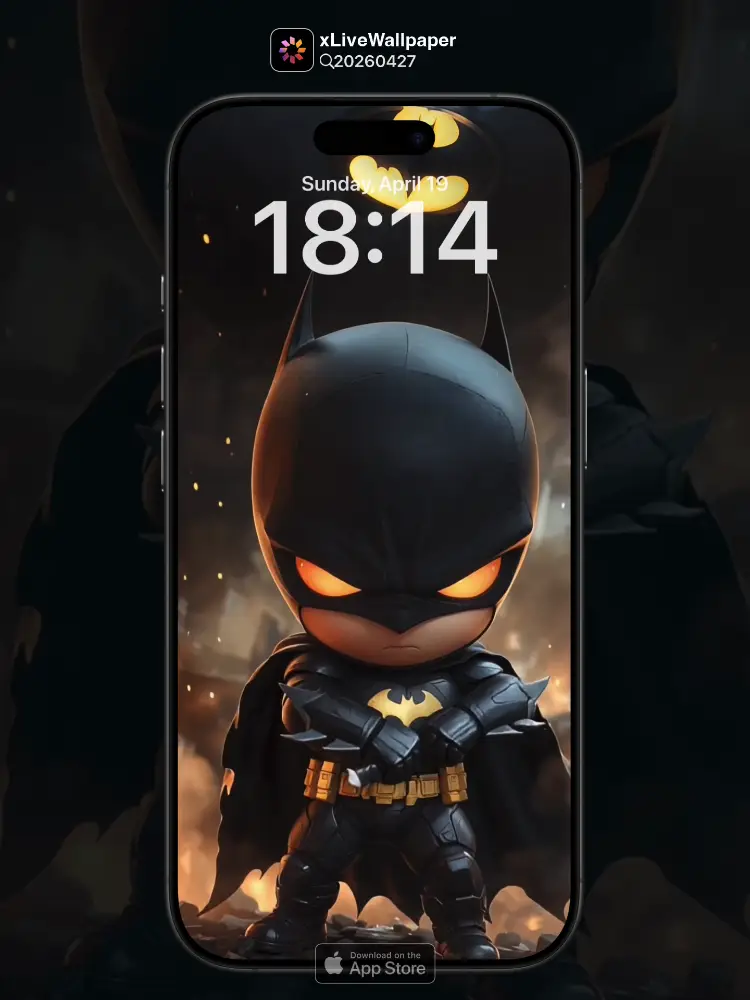
No.20260427 超级英雄 Q版蝙蝠侠(可爱的Q版蝙蝠侠对着镜头打出蝙蝠镖)
Imagine a cute Q-version Batman, with his adorable cape fluttering, poised to throw a shiny batarang right at the camera! 🦇💥 This dynamic live wallpaper brings the superhero action to your screen with every throw. Perfect for fans of the Dark Knight in a playful twist!
You can now join our live wallpaper club at early-bird price, supporting both Android video and iOS Live Photo formats.
https://locklive.gumroad.com/l/vip
iPhone users search ‘20260427’ in xLiveWallpaper App
Download:https://apps.apple.com/app/apple-store/id6747997192?pt=611621&ct=xlivewallpaper&mt=8
#SuperHero #Batman #QVersionBatman #Batarang #LockLive #xLiveWallpaper
No.20260427 超級英雄 Q版蝙蝠俠(可愛的Q版蝙蝠俠對著鏡頭打出蝙蝠鏢)
想像一個可愛的Q版蝙蝠俠,他的斗篷輕輕飄揚,正準備向鏡頭投擲閃亮的蝙蝠鏢!🦇💥 這個動態桌布將超級英雄的動作帶到您的螢幕上,每次投擲都充滿活力。適合黑暗騎士粉絲的俏皮轉折!
現在您可以以早鳥價加入我們的動態桌布俱樂部,同時支援 Android 影片與 iOS 實況照片格式。
https://locklive.gumroad.com/l/vip
iPhone用戶在xLiveWallpaper App中搜尋「20260427」
AppStore下載:https://apps.apple.com/app/apple-store/id6747997192?pt=611621&ct=xlivewallpaper&mt=8
#SuperHero #Batman #QVersionBatman #Batarang #LockLive #xLiveWallpaper
No.20260427 सुपर हीरो Q संस्करण बैटमैन (प्यारा Q संस्करण बैटमैन कैमरे पर बटारंग फेंक रहा है)
एक प्यारा Q संस्करण बैटमैन कल्पना करें, जिसकी प्यारी केप फड़फड़ा रही है, जो कैमरे पर एक चमकदार बटारंग फेंकने के लिए तैयार है! 🦇💥 यह गतिशील लाइव वॉलपेपर हर फेंक के साथ आपके स्क्रीन पर सुपरहीरो एक्शन लाता है। डार्क नाइट के प्रशंसकों के लिए एक खेलपूर्ण मोड़ में परफेक्ट!
अब आप हमारे लाइव वॉलपेपर क्लब में आर्ली बर्ड कीमत पर शामिल हो सकते हैं, जो Android वीडियो और iOS लाइव फोटो प्रारूपों दोनों का समर्थन करता है।
https://locklive.gumroad.com/l/vip
iPhone उपयोगकर्ताओं को xLiveWallpaper ऐप में ‘20260427’ खोजें
Download:https://apps.apple.com/app/apple-store/id6747997192?pt=611621&ct=xlivewallpaper&mt=8
#SuperHero #Batman #QVersionBatman #Batarang #LockLive #xLiveWallpaper
No.20260427 スーパーヒーロー Qバージョン バットマン (可愛いQバージョン バットマンがカメラに向かってバタラングを投げている)
可愛いQバージョンのバットマンが、ケープをひらひらさせながら、カメラに向かって輝くバタラングを投げようとしている姿を想像してみてください!🦇💥 このダイナミックなライブ壁紙は、毎回の投げでスーパーヒーローのアクションをあなたの画面に届けます。ダークナイトファンの遊び心あるひねりにぴったり!
今なら早期割引価格でライブ壁紙クラブにご参加いただけます。Android ビデオと iOS ライブフォトの両フォーマットに対応しています。
https://locklive.gumroad.com/l/vip
iPhoneユーザーはxLiveWallpaperアプリで「20260427」を検索
ダウンロード::https://apps.apple.com/app/apple-store/id6747997192?pt=611621&ct=xlivewallpaper&mt=8
#SuperHero #Batman #QVersionBatman #Batarang #LockLive #xLiveWallpaper
No.20260427 超级英雄 Q版蝙蝠侠(可爱的Q版蝙蝠侠对着镜头打出蝙蝠镖)
想象一个可爱的Q版蝙蝠侠,他的斗篷轻轻飘扬,正准备向镜头投掷闪亮的蝙蝠镖!🦇💥 这个动态壁纸将超级英雄的动作带到您的屏幕上,每次投掷都充满活力。适合黑暗骑士粉丝的俏皮转折!
现在您可以以早鸟价加入我们的动态壁纸俱乐部,同时支持 Android 视频与 iOS 实况照片格式。
https://locklive.gumroad.com/l/vip
iPhone用户在xLiveWallpaper App中搜索「20260427」
AppStore下载:https://apps.apple.com/app/apple-store/id6747997192?pt=611621&ct=xlivewallpaper&mt=8
#SuperHero #Batman #QVersionBatman #Batarang #LockLive #实况全能王
安卓與iPhone動態桌布設定速成指南
下載準備
在本網站選擇喜愛的動態桌布後:
- 安卓用戶:下載MP4格式影片檔
- iPhone用戶:下載Live Photo實況格式
安卓設定步驟(影片檔)
- 下載完成後,進入手機「檔案管理」
- 找到下載的影片檔,長按選擇「設為桌布」
- 或使用第三方應用:安裝「壁纸引擎」「Android版 Wallpaper Engine」應用程式,從應用內選擇本網站下載的影片檔
- 調整設定:建議開啟循環播放,可選擇靜音節省耗電
- 套用完成:選擇設為主畫面或鎖定畫面
iPhone設定步驟(實況格式)
- 匯入檔案:透過 OneDrive 手机應用或 AirDrop 傳到iPhone
- 開啟「照片」應用:找到匯入的實況照片
- 點擊分享圖示 → 選擇「用作背景圖片」
- 調整位置後點擊「設定」
- 重要:進入「設定」>「背景圖片」,確認「原況照片」選項已開啟
- 鎖定畫面下重壓螢幕即可看到動態效果
效能提示
- 安卓旗艦機型可選4K畫質,舊機型建議使用1080p
- iPhone機型仅支援使用1080p
- iPhone機型仅支援使用1-2秒
- iPhone低電量時建議暫停使用動態桌布
- 深色系桌布較節省電力(特別適合OLED螢幕)
本網站特色
- 每週更新獨家動態桌布
- 提供雙平台專用格式
- 檔案已優化,兼顧品質與效能
立即下載,讓您的手機主畫面與眾不同!
Quick Guide to Setting Live Wallpapers on Android & iPhone
Download Preparation
After selecting your favorite live wallpaper on this website:
- Android Users: Download the video file in MP4 format
- iPhone Users: Download the file in Live Photo format
Android Setup Steps (Video File)
- After downloading, open the File Manager on your phone
- Locate the downloaded video file, long-press it and select Set as Wallpaper
- Or use a third-party app: Install applications like Wallpaper Engine or Wallpaper Engine for Android, then select the downloaded video file from within the app
- Adjust settings: It is recommended to enable loop playback, and you can choose to mute the audio to save battery power
- Once applied: Select to set it as the home screen wallpaper or lock screen wallpaper
iPhone Setup Steps (Live Photo Format)
- Import the file: Transfer it to your iPhone via the OneDrive mobile app or AirDrop
- Open the Photos app: Locate the imported Live Photo
- Tap the share icon → Select Use as Wallpaper
- Adjust the position and then tap Set
- Important Note: Go to Settings > Wallpaper and make sure the Live Photo option is enabled
- Press firmly on the screen when it is locked to see the live effect
Performance Tips
- Flagship Android models can support 4K resolution; for older models, 1080p is recommended
- iPhone models only support 1080p resolution
- iPhone models only support Live Photos of 1-2 seconds in length
- It is recommended to pause using live wallpapers when your iPhone is in low battery mode
- Dark-themed wallpapers are more power-efficient (especially suitable for OLED screens)
Website Features
- Exclusive live wallpapers updated weekly
- Specialized formats provided for both platforms
- Optimized files that balance quality and performance
Download now to make your phone's home screen stand out from the crowd!
Related Posts
- Apple WWDC 2026 Live Wallpaper
- Mortal Journey Nangong Wan Chan Nv Tian Yue Formula Live Wallpaper
- Mortal Journey Nangong Wan Evil Slaying Thorn Live Wallpaper
- Mortal Journey Han Li Wind Thunder Wings Live Wallpaper
- SpongeBob Squidward Working Overtime Live Wallpaper
- SpongeBob Dancing SpongeBob Live Wallpaper
- Doraemon Nobita in the Sky Live Wallpaper
- Doraemon Doraemon in the Sky Live Wallpaper
- Toy Story Open the Door Live Wallpaper
- A Record of Mortals Journey to Immortality Han Li Live Wallpaper